# Ansible Satellite Deployment Topologies
This document explains the two supported network topologies for deploying the CMDB-360 Ansible Satellite, and the access model each one enables. Understanding which topology you are using is important because it determines which playbooks (cloud-only vs. machine-level) will work correctly against a client’s assets.
# Overview
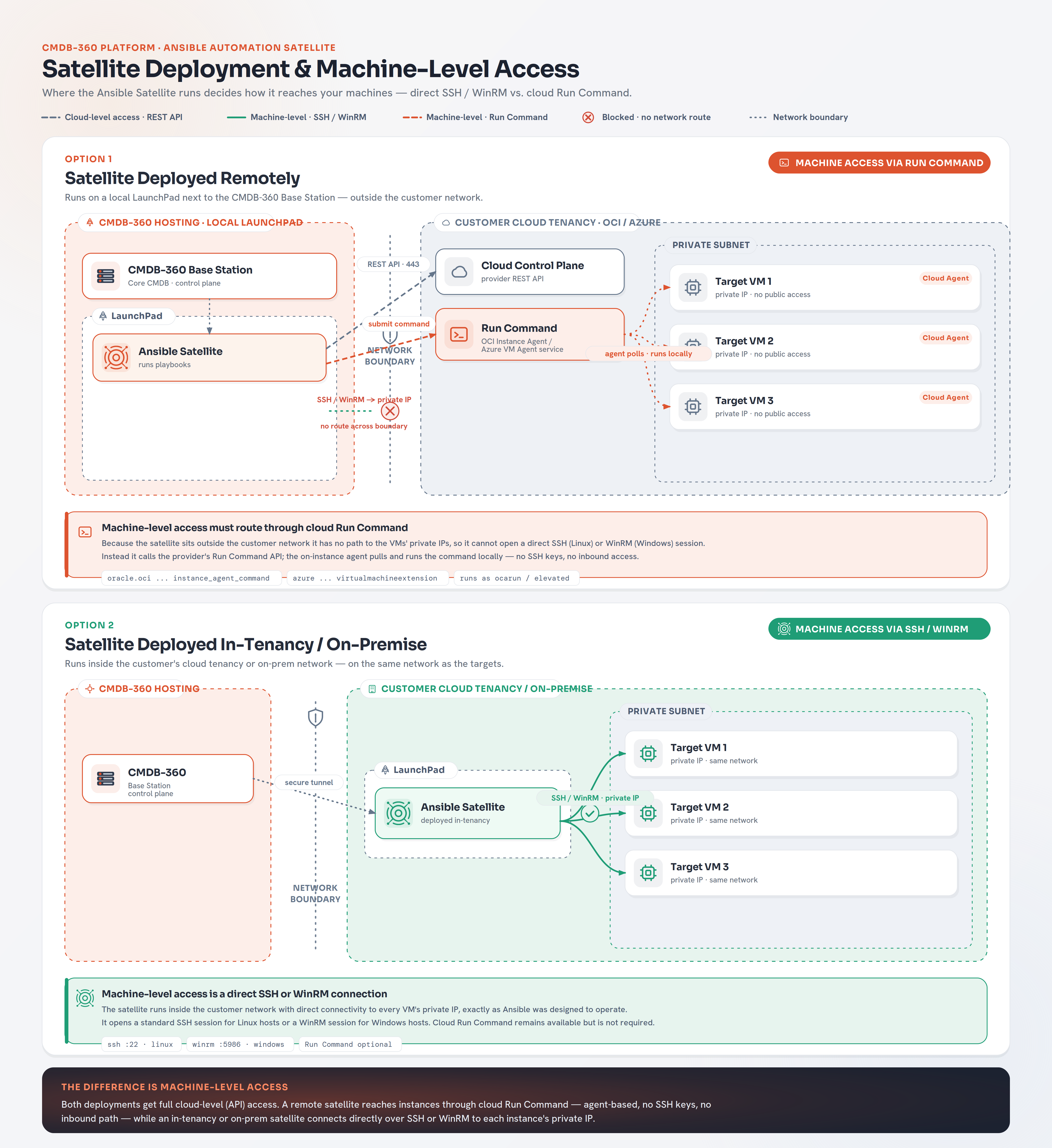
The Ansible Satellite can be placed in one of two locations relative to the client’s assets:
- Remote Deployment — The satellite runs on your own LaunchPad, typically alongside your CMDB-360 Base Station or somewhere outside of the client’s tenancy and network.
- Client-Side Deployment — The satellite runs on a LaunchPad (or as a stand-alone VM) provisioned inside the client’s own tenancy, with direct network access to the client’s assets.
Important
The key distinction about the deployment option to use is whether the Ansible Satellite (either deployed within the LaunchPad or stand-alone VM) has direct network access to the target client assets. This typically means the Ansible Satellite can reach the client target asset using the same local network (or potentially and less likely via the Internet).
The choice of topology does not change how playbooks are written or stored — it changes which type of playbook (cloud-only vs. cloud and machine-level) will succeed when run, because it determines whether the satellite has a network path to the client’s private IP space.
# Option 1: Remotely Deployed (Cloud-Only Access)
In this model, the Ansible Satellite is typically deployed on the LaunchPad next to your CMDB-360 Base Station — not inside the client’s tenancy or virtual network. The satellite therefore has no network route to the client’s private IP addresses and cannot open an SSH or WinRM session directly to a client machine.
All automation against client assets in this topology must be performed using cloud-level access only:
-
Cloud provider Ansible collection modules calls (start/stop/create/destroy/modify VMs, disks, networks, load balancers, etc.) use the client’s cloud credentials stored in your credential files and vault.
-
Note: The agent must be installed and running on the VM for the remote command execution to work. Additional privileges may also be required for the user the agent runs the administrator tasks under, to successfully complete.
Note: AWS provides a connection option through their SSM (Systems Manager) that allows most standard Ansible modules to run remotely on their EC2 instance without the need for local network access or SSH keys. See https://docs.cmdb360.com/docs/Satellites/Ansible-satellite/Playbook-Development/PlaybookOptions for more details
Playbook requirements for this topology:
- The
#CMDB_PB_HOST_CONNheader should be set tocloud(or omitted, sincecloudis the default). - The
hostsline should belocalhost, since no inventory of client machines is being connected to directly. gather_factsshould befalse.- Only modules provided by the relevant cloud collection (or an agent-command module such as
oracle.oci.oci_compute_instance_agent_instance_agent_command) should be used — standard Ansible modules that assume SSH/WinRM connectivity (e.g.ansible.builtin.copy,ansible.builtin.user) will not function, since there is no connection to the host. AWS SSM gets around this restriction.
When to use this topology:
- You want a single, centrally-managed satellite (for each of your CMDB-360 Accounts) that can service clients without deploying infrastructure into the client’s environment.
- The client’s compliance requirements do not require the satellite itself to reside in their tenancy, only that credentials and data remain properly secured.
- Automation needs are limited to cloud resource lifecycle management and command execution that a Run Command style service can cover.
Limitations:
-
No direct file transfer, streaming output, or interactive session with the machine — command agents are polling-based and can introduce delay.
-
Not all systems (such as Vmware) offer an equivalent run-command/agent service; where one is unavailable, machine-level configuration/management is not possible from this topology.
# Option 2: Client-Side Deployment (Cloud + Machine Access)
In this model, the Ansible Satellite is deployed on a LaunchPad (or stand-alone VM) provisioned inside the client’s own tenancy and network. Because the satellite resides on the client’s network, it has direct connectivity to the private IP addresses of the client’s virtual machines and can therefore make full use of both access levels:
- Cloud-level access — identical to Topology 1, using the client’s cloud credentials from your credential files and vault to call cloud provider APIs.
- Machine-level access — the satellite connects directly to client VMs over SSH (Linux) or WinRM (Windows) using your credential files and vault, and the SSH/WinRM user configured under the System Access tab of the CI’s Properties. This enables the full range of standard Ansible modules — file management, user management, package installation, service management, and any Ansible Galaxy collection that expects a live connection to the host.
Playbook requirements for this topology:
- The
#CMDB_PB_HOST_CONNheader should be set tosshorwinrmfor playbooks that need to configure the machine directly, orcloudfor playbooks that only call cloud APIs. If cloud modules are used in combination with standard ansible modules, both connection types should be provided in a comma separated list, such ascloud, ssh. Onlycloudcan be combined with any of the other connection types. - The
hostsline should beallwhen machine-level tasks are performed, since CMDB-360 supplies a dynamic inventory of the selected CI to the play. Cloud tasks within anallhosts playbook should usedelegate_to: localhost, since cloud credentials are only valid from the Ansible controller node (Ansible Satellite). gather_factsmay be enabled where useful, since a live connection to the host exists.
When to use this topology:
- The client requires machine access stay entirely within their own tenancy.
- Automation needs go beyond what a cloud-provider command-agent service can offer — for example, deep OS configuration, compliance remediation, or use of community/Galaxy collections that require a genuine SSH/WinRM connection.
- Low-latency, session-based execution is needed rather than the polling delay inherent to agent/run-command services.
Requirements:
- Network connectivity (typically via VCN/VNet peering, VPN, or the satellite residing on the same private network) from the satellite to the private IP address of each target machine.
- SSH key pairs or WinRM credentials for target machines stored a credentials file and your vault.
# Choosing a Topology
| Provider-Side (Cloud-Only)* | Client-Side (Cloud + Machine) | |
|---|---|---|
| Satellite location | Your LaunchPad / Base Station environment | Client’s tenancy/network |
| Cloud-level access (start/stop/create/destroy assets) | Yes | Yes |
| Machine-level access (SSH/WinRM) | No | Yes |
| OS-level changes (patching, users, files) | Only via cloud Run Command / agent services, where supported | Yes, via any Ansible module |
| Network path to client’s private IPs required | No | Yes |
| Command execution latency | Higher — subject to agent polling interval | Lower — direct session |
| Client data locality | Credentials/vault only | Credentials, vault, and satellite all within client tenancy |
* AWS provides a remote SSM connection ability that does not require local network access to run most machine level Ansible modules and does not have the higher latency.
A single client may also be serviced by satellites in both topologies simultaneously — for example, a remote Ansible satellite handling routine cloud lifecycle automation across a clients tenancy, while a client-side satellite is deployed only where deeper machine-level configuration is required.
CMDB-360 will present the appropriate playbooks for the CI type and provider selected regardless of which satellite ultimately executes them, provided the satellite’s connection type matches what the playbook requires.